Thermostats
The range
One thermostat, two finishes
Same unit behind both faces, in two colours.
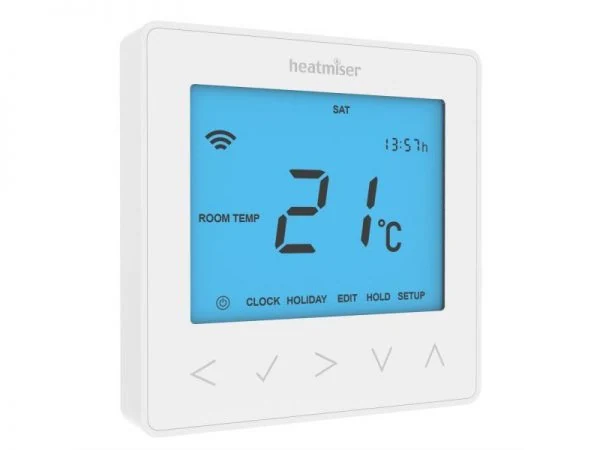
Heatmiser neoStat
The programmable room thermostat we fit most often. It works on its own; with a neoHub the whole house can be controlled from your phone.
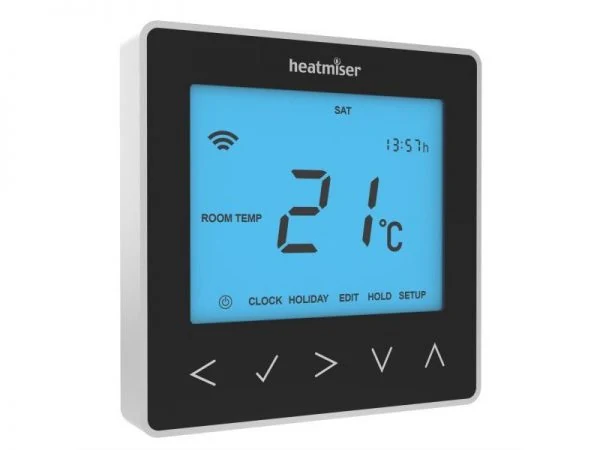
Heatmiser neoStat
Same unit, same functions, dark face — Sapphire black. For darker interiors and feature walls. Both finishes are the same price and the same lead time.
What it does
Features
All of this is standard, in either finish. Most of it we set up for you before we leave the job — you should never need the installer menu.
Approach sensor
The screen and the touch keys wake as your hand gets near.
Mesh networking
Paired to a neoHub, each mains-powered neoStat relays for the others. A stat at the far end of the house reaches the hub through the ones in between — ordinary RF thermostats do not do this.
Optimum start
It learns how quickly your house heats and starts early enough to reach temperature at the set time. It re-learns through the year.
Floor temperature limit
A cap between 20 and 45 °C, set to 28 °C as standard. This is what keeps engineered timber and vinyl from ever being cooked by the slab underneath.
Frost protection
Holds a background 7–17 °C when the heating is otherwise off — 12 °C as standard. A bach or an empty house never gets cold enough to matter.
Holiday mode
Set the date you are back. It drops to the frost setting for the whole time you are away and picks your normal programme up again on the day, without you doing anything.
Temperature hold
An hour, or a day, at a different temperature without touching the schedule. It puts itself back afterwards, so nobody has to remember to undo it.
Keypad lock
A four-digit PIN over the touch keys. Useful in a rental, a holiday house, or where children can reach the thermostat.
Quick start
Your thermostat, in one page
This is the version we leave in the manifold cupboard. Six symbols and three things you will ever actually do — for a system with the timer disabled, which is how most of ours are set up.
- AThe houseWhen you can see the house, the heating is off.
- BThe flameThe flame means the thermostat is calling for heat — the room is below the temperature you set. No flame just means the room is already up to temperature.
- CThe rectangleThis is the cursor. Whatever it is sitting over is what the tick will press.
- DThe power symbolThe on/off target. Put the rectangle over this one.
- EThe tickConfirms. Nothing happens until you press it.
- FThe arrowsUp and down — the temperature you want the room to sit at.
Turn the heating on
- Make sure the rectangle is over the power symbol.
- Press the tick. The house disappears.
- If the flame lights up, it is calling for heat. No flame means the room is already warm enough — it will fire by itself as soon as the room drops below your setting.
Set the temperature
- Make sure the rectangle is over the power symbol.
- Use the up and down arrows to pick the temperature you want.
- Press the tick to confirm.
Turn the heating off
- Make sure the rectangle is over the power symbol.
- Press the tick. The house appears.
Set the room temperature you want, not the floor temperature — usually 20–22 °C in living areas and cooler in bedrooms. A slab takes hours to come up and hours to cool down, so a small overnight setback rather than switching it off is both cheaper and more comfortable than blasting it in bursts. If your system has the timer disabled, these instructions are the whole story.
Specification
Heatmiser neoStat specification
The version supplied in New Zealand. Every figure below is Heatmiser’s own, taken from their datasheet and their installation manual — the manual is at the foot of this page.
The neoStat is a low-current switching thermostat for wet — hydronic — systems: it closes a volt-free contact and something else does the work. Electric underfloor heating is a different animal and takes the neoStat-E, which switches 16 A directly. Figures are subject to change; we confirm the model and the settings for your system before ordering.
For the electrician
Wiring and siting, in short
Full detail is in the installation manual. These are the points most often asked about.
Supply and output
L and N take the 230 V supply. A1 and A2 are the volt-free switched output and will drive normally-open or normally-closed actuators either way. If you need a switched 230 V on A2, link L across to A1.
Probes
RT1 and RT2 take the floor probe or a remote air sensor. Feature 06 then tells the stat which sensors are fitted — if this is set incorrectly, feature 07 (the floor cap) has no sensor to read.
Where it goes
Flush into a back box at least 35 mm deep, at eye level. Not over a radiator, a lamp or a TV, not behind a curtain, not in a draught. It reads room air, so anything warming the wall around it gets read as the room.
Before you leave
Set the programme mode, the comfort levels and the floor cap on site rather than leaving the factory defaults.
This product must only be installed by a qualified electrician and must comply with New Zealand wiring regulations.
Optional
neoHub app control
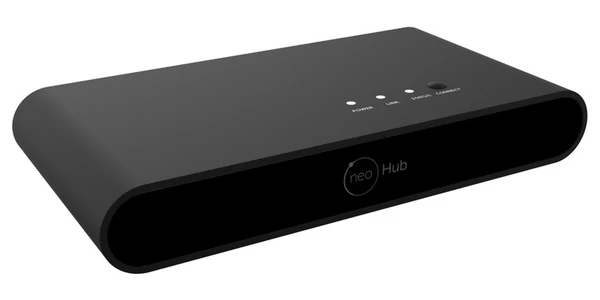
Heatmiser neoHub
A small box that plugs into a spare port on your router with the cable supplied. Every neoStat in the house joins it, and the neoApp then shows the lot — every zone, from anywhere.
If your broadband drops, or the hub is unplugged, nothing in the house stops. Every neoStat keeps its own schedule and keeps heating on its own. You lose the phone, not the heating — which is the right way round.
For a single zone, the neoStat WiFi has wifi built in and needs no hub. It suits a single-room retrofit; a hub is better once there are three or four zones.
Also supplied
The rest of the Heatmiser range
The neoStat covers most houses, but it is one part of a range we stock and fit. If you are specifying a job and want something from the list below, ask — it is all available to us.
neoStat-E
Electric floorsThe same face and the same app, built to switch 16 A directly so it drives an electric floor mat without a contactor. Comes with a floor probe. Black or white.
neoStat WiFi
No hub neededThe neoStat with wifi built in — app control without a neoHub. The sensible choice for one zone or a single-room retrofit. Black or white.
neoHub
The hubWhat the whole neo range talks to. Up to 32 devices, and the point at which Alexa, Google Home and Apple Home start working.
Neo Boost
Wall switchA wall-mounted boost switch for a neo system — a timed run of heating or hot water without reaching for a phone. Good by a back door or in a bathroom.
Heatmiser DS series
Plain and simpleA non-programmable dial thermostat with an automatic set-back, made to sit alongside the UH wiring centres.
Slimline-B
No mains cableBattery-powered and programmable, so there is no cable to chase into the wall. Two AAA cells, about a year each. Suited to retrofits where the wall cannot be opened.
UH4 / UH6 / UH8 wiring centres
Manifold cupboardThe board that ties the thermostats, the actuators and the pump together in the manifold cupboard. Four, six or eight zones.
Heatmiser floor probe
SensorThree metres of lead, laid into the screed at install. It is what lets the thermostat cap the actual floor temperature instead of inferring it from the air.
Pricing depends on the model, the number of zones and what else is going in, so we quote it as part of the job rather than publishing a list. Tell us what you are building and we will price the controls with it.
Downloads
Manuals and guides for this thermostat
Free, and no form to fill in.
Manufacturer documents are published by Heatmiser and are reproduced here for the convenience of our customers. Champion Heating Ltd is an independent installer; Heatmiser and neoStat are trademarks of their respective owners.
What we leave you with
Setup and handover
Schedules that match your week
Not the factory default. Zones set for how you actually live — living areas up before you get home, bedrooms cooler, bathrooms warm for the morning.
A written quick-start
One page for your exact model, like the one above. It goes inside the manifold cupboard so it is still there in five years when somebody new moves in.
Twenty minutes of instruction
We go through the controls with you before we leave.
We have had a great experience working with Champion Heating since they installed their system into our house. Tony is always willing to help whatever the question may be.
Free, no obligation
Thermostat problems
We service and replace these and most other thermostats. We also set up and explain existing controls for new owners.